At a glance
A strong schedule stops the week living in five different places at once. You need one system that shows the walks, the dogs, the notes, and the changes together.
Jennie's reality
This problem grew while juggling two children, cubs, school runs, and a growing client list. That is why the guide focuses on what still works in a normal busy week.
When Jennie first started, she was using notebooks and a paper diary. That felt sensible at the time. It was simple, cheap, and easy enough when there were fewer moving parts. The problem came later, once there were more clients to keep on top of and more life happening around the business as well.
That is the part people do not always talk about. You are not managing your schedule in a quiet office with nothing else going on. You are often doing it around school runs, family life, messages from clients, dogs needing your attention, and the constant small changes that come with running a service business.
Dog walker schedule planning: the quick answer
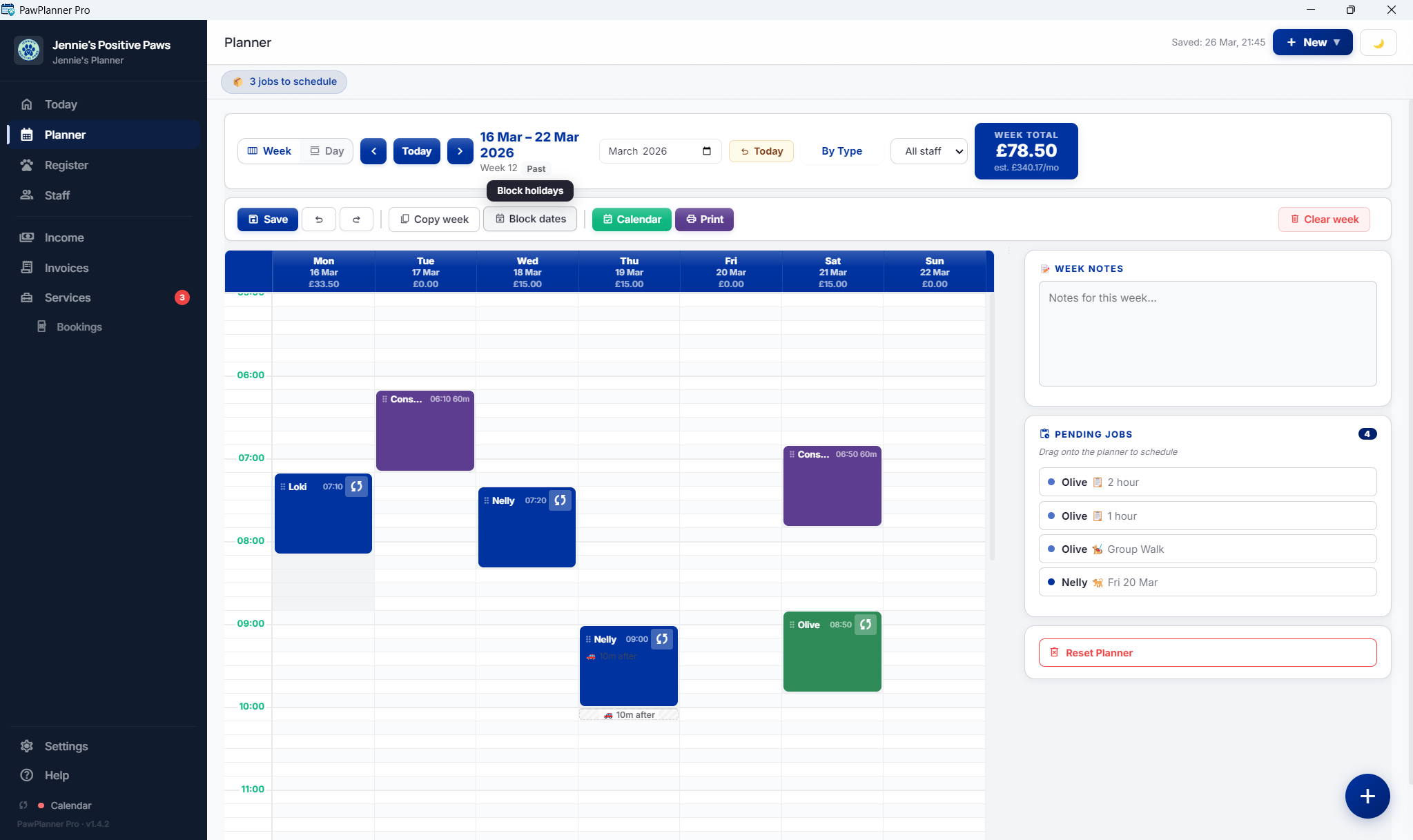
The simplest way to plan a dog walking schedule is to review the whole week before it starts, then keep every walk, dog note, client change, and unscheduled job in one place. A paper dog walking diary can work early on, but once the week gets busy you need a dog walking calendar or planner that shows gaps, clashes, cancellations, staff availability, and notes together.
If your schedule lives across a diary, WhatsApp messages, memory, and a spreadsheet, the problem is not effort. The problem is that the week has no single source of truth.
Why dog walking schedules get messy so quickly
At the beginning, a schedule can feel straightforward. You know your regular dogs. You know roughly which days are busiest. You probably feel like you can keep most of it in your head. For a while, that can be true.
What changes things is repetition combined with variation. The regular weekly walks are only one part of the job. Then you add owner notes, access details, one-off changes, holidays, cancellations, new enquiries, behaviour notes, and the simple fact that you are doing all of this while actually out working. That is where a schedule starts to fray.
What stops working when you rely on your head, a notebook, or a paper diary
A paper diary is not useless. It can be a perfectly good early-stage tool. The issue is not that it is old-fashioned. The issue is that it is fragile. If it is misplaced, if notes are scribbled in different places, or if an update never gets written down because you were in the middle of something else, the whole system becomes harder to trust.
For Jennie, that was the breaking point. It was not one dramatic failure. It was the steady pressure of trying to remember where she was with multiple clients while also fitting work around two children, cubs, and school runs. Once that happens, your schedule starts to depend on memory more than it should, and memory is not a system.
What a proper weekly dog walking setup needs to show
A good dog walking schedule should do more than tell you what time you are next out of the door. It should help you manage the week as a business. That means being able to see your work clearly enough to make decisions, not just react.
- Every walk for the week in one place
- Which dogs belong in which slot
- Any notes that change how the walk needs handling
- Client or dog information that may matter during the day
- Changes, cancellations, and rebookings tracked properly
- A setup that does not rely on you remembering to update three different places later
This is also where screen size matters more than people admit. A full weekly view on a desktop is simply easier to think with when you are balancing multiple clients and trying to plan ahead properly.
Dog walker schedule planning: what to check before the week starts
A useful dog walker schedule planning routine starts before the first walk of the week. Look at your regular walks, one-off changes, pending jobs, cancellations, staff availability, and dog notes in one pass. If you use a dog walking calendar, make sure it shows the practical details you actually need: which dog is going out, who is walking them, how long the walk is, and whether anything has changed since last week.
This is where a paper dog walking diary can become limiting. It records the plan, but it does not always help you spot gaps, clashes, unscheduled work, or changes that affect another part of the week. A clearer weekly planning system should make those problems visible before you are already out on walks.
How to handle changes without the whole week unravelling
Changes are not the exception in a dog walking business. They are part of the rhythm of the work. A client is out unexpectedly. Someone needs to cancel. A dog needs a different arrangement that week. A new enquiry appears and you need to work out whether there is space.
If your system is clear, a change is just a change. If your system is scattered, one change can create five more jobs. You need to update the diary, check old notes, look back through messages, and remind yourself what else that affects. That is the real admin drain.
Even if, like Jennie, you do not charge cancellation fees, you still need a clean way to record what changed so your week stays accurate and your client communication stays calm.
When it is time to move to software
You do not need software just because someone tells you that a proper business should have it. You need it when your current system is starting to cost you time, attention, and peace of mind.
That point usually arrives when:
- you are checking two or three places to confirm the same booking
- you have started losing notes or forgetting updates
- you are trying to manage the week in your head
- you need client records, schedule, and invoicing to connect better
- you can feel the admin pulling energy away from the actual work
If that sounds familiar, this is exactly the gap Pack Planner Pro dog walking scheduling software was built for. It gives you a proper weekly planner, dog records, invoicing, and business admin in one place, without another monthly subscription sitting on top of the business. You can also see the broader dog walking software UK page if you want the full feature set.
A better goal than being perfectly organised
Most dog walkers do not need a system that looks impressive. They need one that still works on a busy Wednesday after a cancellation, a schedule change, a school run, and a client message that came in ten minutes ago.
That is the real standard worth aiming for. Not perfect. Reliable.
FAQ
How do professional dog walkers organise their schedule?
Most experienced dog walkers use one clear weekly system rather than spreading information across a diary, texts, and memory. The stronger the business gets, the more valuable it becomes to keep the week, dog notes, and client admin tied together.
Should I use a diary, spreadsheet, or software for dog walking?
A diary can work in the early stage and a spreadsheet is often the next sensible step. But if you are managing repeat clients, schedule changes, and admin at the same time, software usually gives you a more reliable weekly system.
Can I manage my dog walking schedule on my phone?
You can manage parts of it, but full weekly planning is often easier on a larger screen. A desktop view makes it much easier to understand the shape of the week and make changes confidently.
What is the best way to handle last-minute changes?
The simplest answer is to keep changes in one central system and update them straight away. Problems grow when changes are split between messages, notes, and memory.
What should a dog walking calendar include?
A dog walking calendar should show the day, time, dog, client, walker, walk type, and any notes that change how the job needs handling. For a busier business, it should also help you spot unscheduled work, staff holidays, cancellations, and gaps in the week.